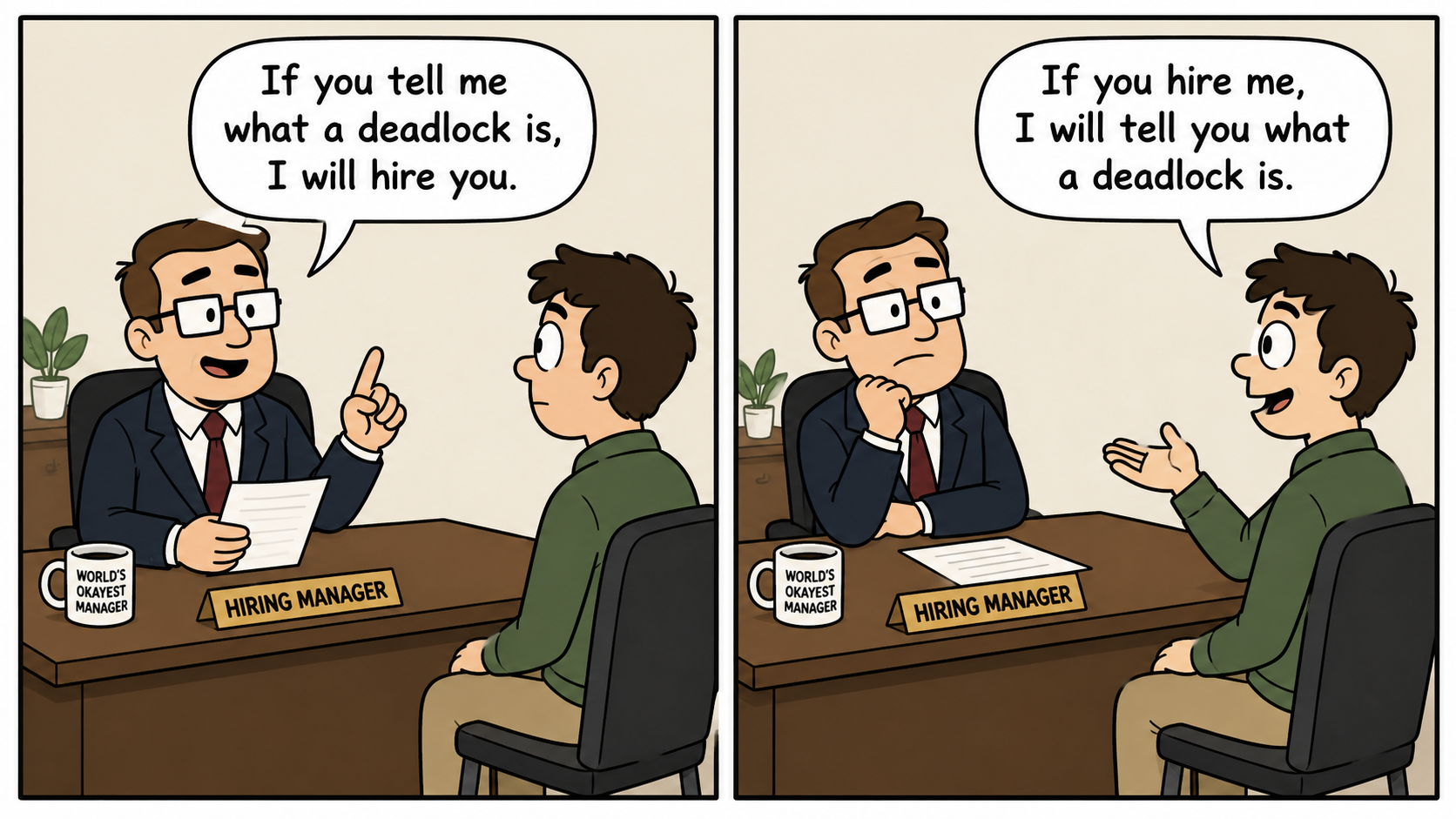
Two sessions update the same row. Most DBAs expect blocking — one session waits, the other finishes, done. Instead, SQL Server returns error 1205: deadlock victim.
A deadlock is a circular dependency in which each participant holds a resource another participant needs.
The answer
One row can deadlock against itself. On a clustered table, a single row is represented as two separate lockable resources — a clustered index KEY and a nonclustered index KEY. When two sessions acquire those two resources in opposite order, the row itself is irrelevant to the cycle. Only the physical resources and the order they were acquired in matter.
What you will learn
- Why a single row is actually two lockable index-key resources on a clustered table
- How to capture the deadlock graph from
system_healthbefore reaching for a custom Extended Events session - How to read the graph precisely: victim, process, execution stack, resources, and lock modes
- How to reproduce and prove the one-row cycle in a lab, from row count to reversed lock ownership
Scope
This article examines a specific lock deadlock involving clustered and nonclustered index KEY resources. It is not a complete taxonomy of SQL Server deadlocks. It does not cover heap/RID deadlocks on tables without a clustered index, distributed transaction deadlocks, or range-lock deadlocks under serializable isolation. SQL Server 2016 and later; locking and optimizer behaviour vary by release, edition, compatibility level, and configuration. The Extended Events syntax targets SQL Server 2016+. Treat the deadlock graph from your environment as the authoritative source of truth — not this article.
Blocking and deadlocks are not the same thing
Blocking is a linear wait: one session waits for another to release a lock, and the wait ends once that session commits, rolls back, or times out.
A deadlock is a cycle:
Session A holds Resource 1 and waits for Resource 2
Session B holds Resource 2 and waits for Resource 1
Neither session can proceed without the other releasing first. SQL Server’s lock monitor detects the cycle and selects one transaction as the deadlock victim, terminating it with error 1205:
Transaction (Process ID N) was deadlocked on {resource} resources with another process and has been chosen as the deadlock victim. Rerun the transaction.
One row, two lockable index keys
SQL Server locks physical resources, not business concepts.
| Table design | Base-row locator stored by a nonclustered index | Common resource pattern |
|---|---|---|
| Clustered table | Clustered index key | Nonclustered KEY ↔ clustered KEY |
| Heap | RID (file:page:slot) |
Nonclustered KEY ↔ heap RID |
On a clustered table, a nonclustered index stores the clustered key as its row locator. That means a single row is physically represented twice: once as a clustered index key, and once inside every nonclustered index that covers it. A statement that seeks the nonclustered index and then reaches the base row needs locks in both structures — even when it is the only row involved anywhere in the transaction.
On a heap, a nonclustered index stores a RID instead — a physical pointer to the heap page and slot. A deadlock graph involving a heap shows KEY for the nonclustered resource and RID for the heap row. The resource types differ; the same two-structures-for-one-row risk does not disappear.
Several factors make this pattern common:
- Updating an indexed column triggers nonclustered index maintenance, adding that index’s key resource to the transaction’s lock set.
- A statement that seeks a nonclustered index but needs columns not covered by it performs a key lookup into the clustered index, acquiring a second lock in a separate structure.
- Query plans, isolation level, lock escalation, concurrent timing, and index coverage all affect which resources actually appear in the deadlock graph.
Ordinary contention on one row is blocking, not deadlock:
Ordinary same-row contention:
  Session 1 holds the row resource
  Session 2 waits
  Result: blocking
A cycle forms only when the two sessions reach the same row through different index paths, in opposite order:
Same-row index-path cycle:
  Session 1 holds clustered KEY and waits for nonclustered KEY
  Session 2 holds nonclustered KEY and waits for clustered KEY
  Result: deadlock
The intended resource cycle for the lab later in this article:
Session 1
  accesses the row through the clustered primary key
  holds a clustered-index KEY resource
  changes an indexed column — triggers nonclustered-index maintenance
  requires a nonclustered-index KEY resource

Session 2
  accesses the same row through a nonclustered index
  holds a nonclustered-index KEY resource
  requires the clustered-index KEY / base-row resource

Circular wait:
  clustered KEY → nonclustered KEY
  nonclustered KEY → clustered KEY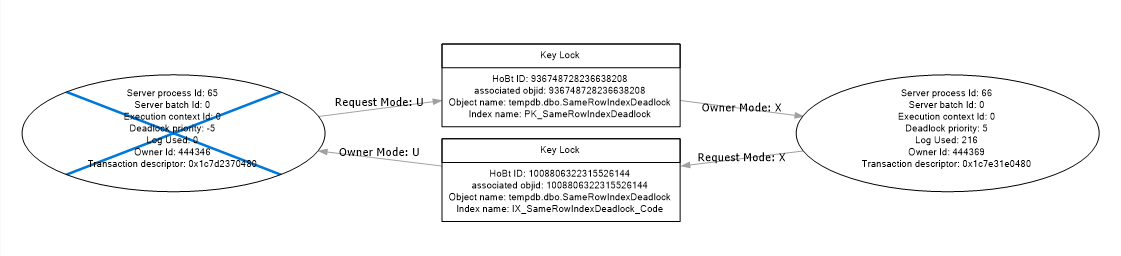
Capture the graph
Do not create a custom Extended Events session first. Every SQL Server instance already runs the built-in system_health session, and it captures xml_deadlock_report by default.
Check system_health first
Query the in-memory ring buffer target:
;WITH RingBufferData AS
(
    SELECT CAST(xet.target_data AS xml) AS target_data
    FROM sys.dm_xe_session_targets AS xet
    JOIN sys.dm_xe_sessions AS xe
        ON xe.address = xet.event_session_address
    WHERE xe.name = 'system_health'
      AND xet.target_name = 'ring_buffer'
)
SELECT
    event_xml.value('(@timestamp)[1]', 'datetime2') AS event_time,
    event_xml.query('.')                            AS deadlock_graph
FROM RingBufferData
CROSS APPLY target_data.nodes('RingBufferTarget/event[@name="xml_deadlock_report"]') AS t(event_xml);
The ring buffer is memory-resident and rotates, so older events disappear. For longer retention, read the system_health event file target instead:
SELECT
    CAST(event_data AS xml) AS deadlock_graph
FROM sys.fn_xe_file_target_read_file
(
    N'system_health*.xel', NULL, NULL, NULL
)
WHERE object_name = 'xml_deadlock_report';
This requires no setup, Microsoft documents it as capturing deadlock graphs by default, and it is almost always where a deadlock investigation should start. A dedicated Extended Events session is not required for basic deadlock analysis — see the appendix if you need guaranteed retention beyond what system_health provides.
Read the graph correctly
Work through the XML in this order, not top to bottom.
Victim list. <deadlock><victim-list> names the id of the process that was rolled back. Cross-reference that id against <process-list> — everything else in the graph should be read relative to which side is the victim and which is the survivor.
Process list. Each <process> node under <process-list> is one session: its spid, isolationlevel, transaction start time, and login/host context.
Execution stack. <executionStack> identifies the specific statement each session was executing at the moment the cycle was detected — not what the whole transaction was doing. <inputbuf> shows the submitted batch or procedure call, which can contain more than that one statement; treat <executionStack>, not <inputbuf>, as the pointer to what was actually running.
Resource list. <resource-list> enumerates the physical resources in the cycle. For this pattern, expect exactly two <keylock> nodes, one per index involved.
Owner and waiter modes. Each <keylock> has an <owner-list> and a <waiter-list>, and every entry carries a lock mode (X, U, S, and so on). The cycle is only real if ownership is reversed across the two resources: the session that owns resource A must be the one waiting on resource B, and vice versa.
HoBT-to-index mapping. Each <keylock> carries an associatedObjectId, which is a HoBT ID, not an index name. Map it back to an index with:
SELECT
    OBJECT_SCHEMA_NAME(p.object_id) AS schema_name,
    OBJECT_NAME(p.object_id)        AS table_name,
    i.name                          AS index_name,
    p.hobt_id
FROM sys.partitions AS p
JOIN sys.indexes AS i
    ON i.object_id = p.object_id
   AND i.index_id = p.index_id
WHERE p.object_id = OBJECT_ID('dbo.SameRowIndexDeadlock');
Do this before assuming which index each resource belongs to. The graph will not name the index for you.
Lab
The video below uses tight WHILE loops to simulate a busy transactional application repeatedly hitting the same row, increasing the odds that both sessions collide at the exact moment needed to form the cycle.
A loop is not required. Even without one, the same cycle can deadlock. The lab below reproduces it deterministically by simulating an application that locks the row it intends to update before it updates it — using WAITFOR DELAY to hold that lock open long enough for the other session to do the same.
Lab warning: This is a race-condition reproduction. Lock hints influence access and locking behavior but do not guarantee the same result across every version and configuration.
The lab keeps a single row throughout. There is no second row anywhere in this setup — that is the point.
Setup
USE tempdb;
GO

DROP TABLE IF EXISTS dbo.SameRowIndexDeadlock;
GO

CREATE TABLE dbo.SameRowIndexDeadlock
(
    Id      int          NOT NULL,
    Code    varchar(20)  NOT NULL,
    Qty     int          NOT NULL,
    Padding char(2000)   NOT NULL
        CONSTRAINT DF_SameRowIndexDeadlock_Padding
        DEFAULT REPLICATE('x', 2000),

    CONSTRAINT PK_SameRowIndexDeadlock
        PRIMARY KEY CLUSTERED (Id)
);
GO

CREATE NONCLUSTERED INDEX IX_SameRowIndexDeadlock_Code
ON dbo.SameRowIndexDeadlock (Code);
GO

INSERT dbo.SameRowIndexDeadlock (Id, Code, Qty)
VALUES (1, 'A', 0);
GO
Code is indexed because updating it requires nonclustered-index maintenance. Updating only Qty does not change the nonclustered key and therefore does not normally require that index resource. Session 1 changes Code (triggering index maintenance) while Session 2 locates the same row through the Code index.
Map HoBT IDs before running the sessions, using the query from the previous section. Confirm system_health is running (it is, by default) or start the CaptureDeadlocks session before proceeding.
Each session below takes its first lock, then uses WAITFOR DELAY to hold it open while the other session takes its own first lock. This replaces a tight retry loop with a deterministic timing window: start Session 1, then start Session 2 before Session 1’s delay elapses, and the cycle forms on the first attempt.
Session 1 — clustered-key path, then indexed-key maintenance
SET NOCOUNT ON;
SET DEADLOCK_PRIORITY HIGH;

BEGIN TRAN;

-- Step 1: take a lock on the clustered-index KEY only, without touching the Code index
SELECT Qty
FROM dbo.SameRowIndexDeadlock WITH (UPDLOCK, INDEX(PK_SameRowIndexDeadlock))
WHERE Id = 1;

WAITFOR DELAY '00:00:05';

-- Step 2: changing Code triggers nonclustered-index maintenance — needs the nonclustered KEY next
UPDATE d
   SET Code =
       CASE Code
           WHEN 'A' THEN 'B'
           ELSE 'A'
       END
FROM dbo.SameRowIndexDeadlock AS d WITH
(
    INDEX(PK_SameRowIndexDeadlock)
)
WHERE d.Id = 1;

COMMIT TRAN;
Session 2 — nonclustered-index path to the same row
SET NOCOUNT ON;
SET DEADLOCK_PRIORITY LOW;

BEGIN TRAN;

-- Step 1: take a lock on the nonclustered-index KEY only, without touching the base row
SELECT Code
FROM dbo.SameRowIndexDeadlock WITH (UPDLOCK, INDEX(IX_SameRowIndexDeadlock_Code))
WHERE Code IN ('A', 'B');

WAITFOR DELAY '00:00:05';

-- Step 2: updating Qty requires a lookup into the clustered row — needs the clustered KEY next
UPDATE d
   SET Qty = Qty + 1
FROM dbo.SameRowIndexDeadlock AS d WITH
(
    INDEX(IX_SameRowIndexDeadlock_Code)
)
WHERE d.Code IN ('A', 'B');

COMMIT TRAN;
Start Session 1 first. Start Session 2 within the five-second window, before Session 1’s WAITFOR DELAY completes — both sessions must hold their step 1 lock before either reaches step 2. Session 2 uses DEADLOCK_PRIORITY LOW so it is chosen as the victim when the cycle forms, making the result easier to observe.
Prove the result
Do not stop at “we got a deadlock.” Prove it is the specific one-row, two-KEY cycle this article describes.
The table contains one row.
SELECT COUNT(*) AS row_count FROM dbo.SameRowIndexDeadlock;Expect 1. There is no second row for either session to have collided on — whatever the graph shows, it cannot be ordinary two-row contention.
Actual execution plans. Capture actual, not estimated, plans for each session’s step 2 UPDATE. Confirm Session 1’s plan updates the clustered index directly and performs nonclustered-index maintenance on IX_SameRowIndexDeadlock_Code, and Session 2’s plan seeks IX_SameRowIndexDeadlock_Code and then reaches the clustered row. Both plans should report exactly one row affected.
Two KEY resources in the graph. <resource-list> should contain exactly two <keylock> nodes. Map each associatedObjectId with the HoBT query above and confirm one resolves to PK_SameRowIndexDeadlock and the other to IX_SameRowIndexDeadlock_Code.
Reversed ownership and waits. On the clustered-key <keylock>, Session 1 should appear in <owner-list> and Session 2 in <waiter-list>. On the nonclustered-key <keylock>, ownership should be the mirror image: Session 2 owns, Session 1 waits. That reversal across the two resources — not the row count, not the table design — is what makes it a cycle rather than a coincidence.
In practice
Deadlocks of this type appear regularly in systems with:
- Mixed index access paths under concurrent load. One process seeks through a nonclustered index while another updates the same indexed column through the clustered path.
- Frequent updates to indexed columns. Every write to an indexed column triggers nonclustered-index maintenance, adding that index’s key resource to the transaction’s lock set.
- Key lookups from a nonclustered seek. A query that seeks a nonclustered index but needs columns outside it performs a key lookup into the clustered index, acquiring a second resource in the same statement.
- Overlapping transaction timing. The cycle only forms when both sessions’ conflicting acquisitions overlap in time; anything that extends how long a session holds its first lock widens that window.
Mitigation hierarchy
Address deadlocks in this order. Higher items are structural fixes; lower items are containment.
- Align both access paths where the application controls them. If every transaction that touches resources A and B always acquires A before B, no cycle can form on those resources — but in an index-path deadlock, SQL Server’s execution plan controls much of the internal lock-acquisition order, not application code alone. The application cannot always dictate which B-tree lock is taken first. Practical structural fixes include aligning both access paths, changing an index, eliminating a key lookup, avoiding an unnecessary indexed-column update, rewriting the query, or shortening the transaction.
- Shorten transactions and remove non-database work from inside them. Remote API calls, file I/O, and user interaction inside a transaction extend lock duration unnecessarily.
- Create or refine indexes to reduce lock footprint. A covering index may remove a key lookup, eliminating one resource from a two-resource deadlock cycle — but it also adds an index every writer must maintain and lock. Validate the outcome against the actual execution plan and deadlock graph, not just the index definition.
- Avoid updating indexed columns unnecessarily. Changing an indexed column triggers nonclustered index maintenance, adding resources to the transaction’s lock set.
- Batch large updates. Processing thousands of rows in a single transaction holds a large lock set for an extended window. Smaller batches reduce collision probability.
- Use row versioning strategically.
READ_COMMITTED_SNAPSHOTlets readers access row versions instead of taking shared locks, which reduces many reader-writer cycles involving shared data locks. It does not eliminate all read-write deadlocks, and it does nothing for write-write deadlocks or cycles involving schema, metadata, application, memory, or thread resources — including the index-path cycle covered in this article. - Implement retry handling for error 1205. Applications must be prepared to retry the deadlock victim’s transaction. Retry logic is containment, not a fix.
- Use
SET DEADLOCK_PRIORITYonly when there is a clear business decision. Lowering priority on a background batch so online transactions always survive is a legitimate operational choice — not a substitute for addressing the root cause.
Troubleshooting checklist
- Capture the deadlock graph before investigating anything else.
- Identify every
KEYandRIDresource in the graph. - Map each
KEYresource to its index name using the HoBT ID. - Confirm the exact statements executing at the point of deadlock.
- Review the execution plans for those statements — identify seeks, scans, and key lookups.
- Check transaction duration: how long did each session hold its first lock before the cycle formed?
- Compare the resource acquisition order across all code paths that touch those resources.
- Confirm row identity from the statement predicates and table contents — a HoBT-to-index mapping proves which indexes were involved, not which row.
- Validate under representative concurrent load, not a single-session test.
- Keep error 1205 retry logic in place as a safety net after the fix is deployed.
Do not do this
- Do not use
NOLOCK(orREAD UNCOMMITTED) as a deadlock fix. It allows dirty reads and does not prevent write-write deadlocks. - Do not add index hints or force plans without evidence from the deadlock graph and the actual execution plans. Hints constrain what SQL Server can optimise.
- Do not treat retry logic as the root-cause fix. It prevents the application from crashing; it does not change the underlying lock ordering problem.
Official references
- Deadlocks guide — Microsoft Learn
- Transaction locking and row versioning guide
- Clustered and nonclustered indexes described
- Use the system_health session
- Extended Events
- Table hints
Appendix: A dedicated Extended Events session
system_health covers basic deadlock analysis. Create a dedicated session only when an investigation needs guaranteed capture over a longer period, isolation from other diagnostic noise, or filtering on a specific database or session — this is a production-retention pattern, not a prerequisite for reading a deadlock graph.
CREATE EVENT SESSION [CaptureDeadlocks]
ON SERVER
ADD EVENT sqlserver.xml_deadlock_report
(
    ACTION
    (
        sqlserver.sql_text,
        sqlserver.database_name,
        sqlserver.session_id
    )
)
ADD TARGET package0.event_file
(
    SET filename           = N'C:\SQLLogs\DeadlockCapture.xel',
        max_file_size      = 50,
        max_rollover_files = 5
);
GO

ALTER EVENT SESSION [CaptureDeadlocks] ON SERVER STATE = START;
GO
Read it the same way as the system_health file target:
SELECT
    CAST(event_data AS xml) AS deadlock_graph
FROM sys.fn_xe_file_target_read_file
(
    N'C:\SQLLogs\DeadlockCapture*.xel', NULL, NULL, NULL
)
WHERE object_name = 'xml_deadlock_report';
Stop and drop it once the investigation is over:
ALTER EVENT SESSION [CaptureDeadlocks] ON SERVER STATE = STOP;
GO

DROP EVENT SESSION [CaptureDeadlocks] ON SERVER;
GO
Conclusion
Return to the job interview. The hiring manager and the candidate each hold something the other needs. Neither will release first. SQL Server detects the cycle and terminates one session — the deadlock victim — efficiently and without sentiment.
One row. Two indexes. One deadlock. A deadlock is not two sessions wanting the same thing — it is two sessions refusing to release what they already hold while waiting for the other to move. The row they were contending over was never two rows. It was one, represented twice.
Read the graph. Keep the retry logic.
Continue reading
- SQL Server tempdb on Azure Ephemeral Disks: It Does Not Need Persistence. Its Directory Does.
- Oracle Time Zone Layers: Why Changing One Setting Is Never Enough
Marios Pavlidis Principal Database Administrator